
Introduction
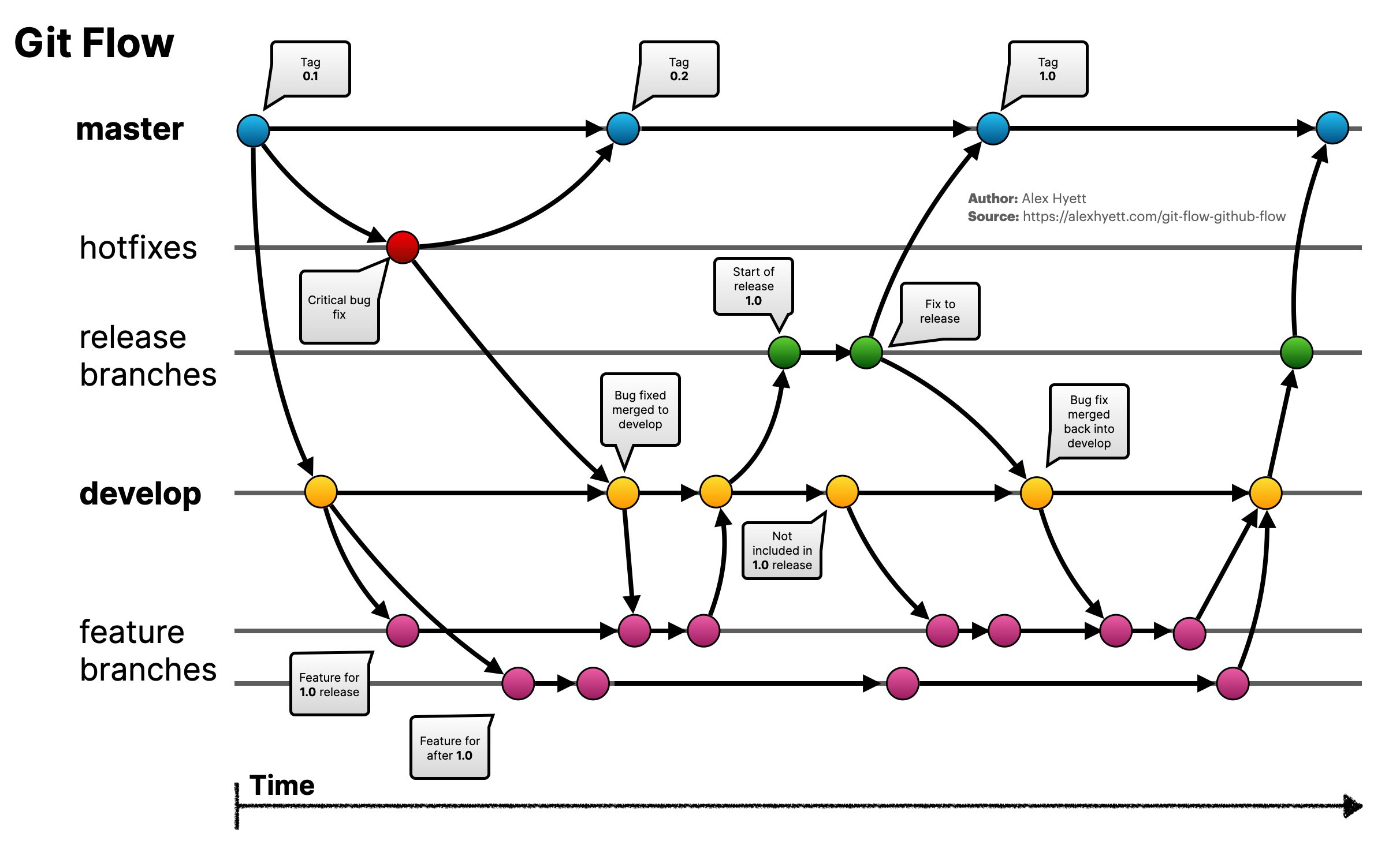
In the software development process, you will certainly have to work as part of a team. Gitflow is a branching model and a tool that helps organize the software development workflow more efficiently. It supports managing branches in the development process, ensuring clarity in how software is deployed, tested, and released.
Gitflow is suitable for projects with long development lifecycles, multiple team members, and strict control requirements between stages. The tool is implemented through the git flow command, which automates the creation, merging, and deletion of branches according to defined rules.
Main Branches in Gitflow
Gitflow defines 5 types of branches with different roles:
1. Permanent Branches
master
- Purpose: Contains stable source code that has been deployed to production.
- Rules:
- Only merge from
releaseorhotfix. - Every commit on this branch must be accompanied by thorough testing.
- Only merge from
- In practice:
- When a client requests an urgent hotfix (e.g., fixing a failed payment bug), create a
hotfix/bug-payment-fixbranch frommaster.
- When a client requests an urgent hotfix (e.g., fixing a failed payment bug), create a
develop
- Purpose: Contains the latest updated source code, not yet released but ready for testing.
- Rules:
- This is where all
featurebranches are merged. - Used to prepare for releases (
release).
- This is where all
- In practice:
- After completing a new feature, the DEV creates a Pull Request from
feature/add-payment-methodintodevelop.
- After completing a new feature, the DEV creates a Pull Request from
2. Temporary Branches
feature/*
- Purpose: Develop new features.
- How to create:
git flow feature start add-user-login - In practice:
- When you need to add a login feature to the application, create a feature/add-user-login branch from develop. After completion, the DEV merges it back into develop and deletes the feature/add-user-login branch.
Basic Gitflow Tools and Commands
- Initialize Gitflow:
git flow init. - Create a new branch:
- Feature:
git flow feature start feature-name. - Release:
git flow release start release-name. - Hotfix:
git flow hotfix start hotfix-name.
- Feature:
- Finish a branch:
- Feature:
git flow feature finish feature-name. - Release:
git flow release finish release-name. - Hotfix:
git flow hotfix finish hotfix-name.
- Feature:
Commonly Used Git Commands
| Command | Description |
|---|---|
git add | Add changes to the Staging Area. |
git commit | Save changes to the Local Repository. |
git push | Push changes from Local Repository to Remote Repository. |
git pull | Update new code from Remote Repository into the Working Directory. |
git fetch | Fetch data from Remote Repository to Local Repository. |
git branch | Create and manage branches. |
git checkout | Switch between working branches. |
git merge | Merge branches together. |
git rebase | Restructure commit history for a cleaner log. |
git reset | Undo changes at different levels. |
git status | Check the current status of the Working Directory. |
git log | View commit history. |
git diff | Compare differences between versions. |
git tag | Create, list, and manage tags. |
Conventions When Working with Gitflow
Branch Naming Conventions:
- Features:
feature/* - Bug fixes:
bugfix/* - Releases:
release/* - Hotfixes:
hotfix/*
Commit Conventions:
feat:Add a new feature.fix:Fix a bug.chore:Changes that do not affect logic (e.g., configuration, documentation).refactor:Improve code without changing functionality.
Workflow with Gitflow
1. For DEVs
- Main responsibilities:
- Develop features (
feature). - Fix bugs (
bugfix,hotfix).
- Develop features (
- Workflow:
- Create a new branch from
developormaster(depending on the case).git flow feature start add-new-payment - Work on the dedicated branch, commit changes.
git add . git commit -m "feat: add new payment method" - When complete, create a Pull Request to merge into
develop. - Delete the branch after it has been merged:
git flow feature finish add-new-payment
- Create a new branch from
2. For LEADs
- Main responsibilities:
- Review code, ensure quality before merging.
- Organize
releasebranches to prepare for releases.
- Workflow:
- Check the
developbranch before creating areleasebranch:git flow release start v1.1.0 - Fix bugs and update documentation if needed.
- Merge
releaseintomasteranddevelopwhen complete:git flow release finish v1.1.0
- Check the
3. For EMs (Engineering Managers)
- Main responsibilities:
- Manage releases and urgent bug fixes.
- Ensure all important changes are updated in both
masteranddevelop.
- Workflow:
- When there is an urgent bug, create a
hotfixbranch frommaster:git flow hotfix start fix-crash-error - Fix the bug, test thoroughly, and merge into
master:git flow hotfix finish fix-crash-error
- When there is an urgent bug, create a
Case Study: Implementing Gitflow in a Real Sprint
Context
Sprint RC13 runs from October 1, 2023 to October 15, 2023, requiring 3 releases:
RC13-release1: October 5, 2023RC13-release2: October 10, 2023RC13-release3: October 15, 2023
Implementation Process
Task distribution:
- Create
featurebranches for PBIs:git flow feature start add-user-authentication git flow feature start improve-performance - Merge completed features into
develop.
- Create
Preparing for release:
- Before the
RC13-release1release date, create areleasebranch:git flow release start RC13-release1 - Fix bugs on the
releasebranch if needed and merge intomaster.
- Before the
Urgent bug fixes:
- If
RC13-release2encounters a critical bug after release, create ahotfixbranch:git flow hotfix start fix-login-error - Fix the bug, test, and merge back into
masteranddevelop.
- If
Rules for Projects Using Gitflow
- If CI/CD pipeline fails -> Reject pull request.
- Code must be reviewed by at least 2 people.
- No direct commits to
masterordevelop.
Conclusion
Gitflow brings clarity and better organization to the software development process, especially for large-scale projects. Understanding and applying Gitflow will help teams work more efficiently, minimize code conflicts, and ensure high-quality products when delivered to customers.