
Introduction
The ability to conditionally turn features on or off in your application without redeploying the code is a powerful tool. Feture flags are software development technique that allows you to wrap application features in a conditional statement. You can then toggle the feature on or off in runtime to control which features are enabled.
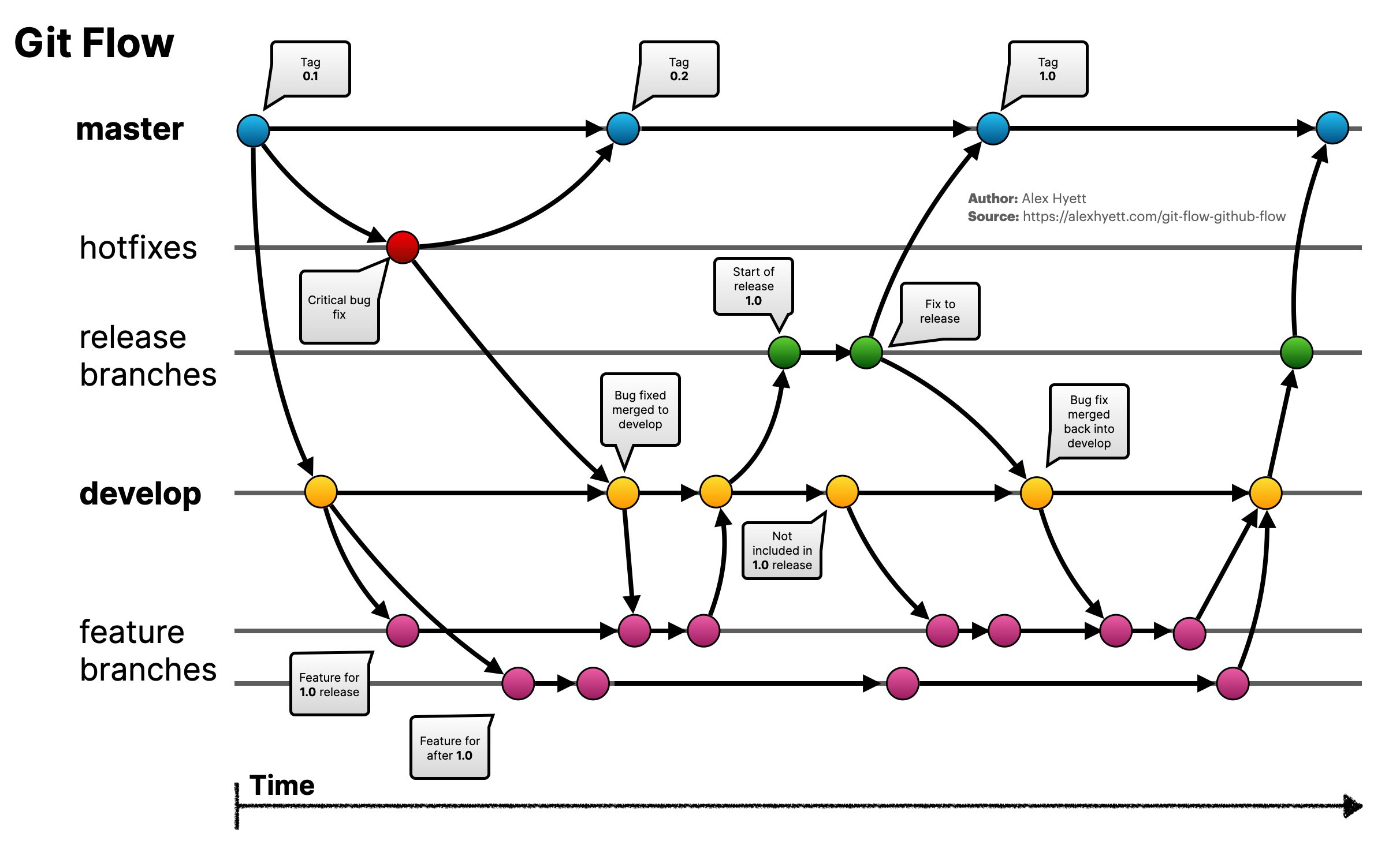
Main Branches in Gitflow
Gitflow defines 5 types of branches with different roles:
1. Permanent Branches
master
- Purpose: Contains stable source code that has been deployed to production.
- Rules:
- Only merge from
releaseorhotfix. - Every commit on this branch must be accompanied by thorough testing.
- Only merge from
- In practice:
- When a client requests an urgent hotfix (e.g., fixing a failed payment bug), create a
hotfix/bug-payment-fixbranch frommaster.
- When a client requests an urgent hotfix (e.g., fixing a failed payment bug), create a
develop
- Purpose: Contains the latest updated source code, not yet released but ready for testing.
- Rules:
- This is where all
featurebranches are merged. - Used to prepare for releases (
release).
- This is where all
- In practice:
- After completing a new feature, the DEV creates a Pull Request from
feature/add-payment-methodintodevelop.
- After completing a new feature, the DEV creates a Pull Request from
2. Temporary Branches
feature/*
- Purpose: Develop new features.
- How to create:
git flow feature start add-user-login - In practice:
- When you need to add a login feature to the application, create a feature/add-user-login branch from develop. After completion, the DEV merges it back into develop and deletes the feature/add-user-login branch.
Basic Gitflow Tools and Commands
- Initialize Gitflow:
git flow init. - Create a new branch:
- Feature:
git flow feature start feature-name. - Release:
git flow release start release-name. - Hotfix:
git flow hotfix start hotfix-name.
- Feature:
- Finish a branch:
- Feature:
git flow feature finish feature-name. - Release:
git flow release finish release-name. - Hotfix:
git flow hotfix finish hotfix-name.
- Feature:
Commonly Used Git Commands
| Command | Description |
|---|---|
git add | Add changes to the Staging Area. |
git commit | Save changes to the Local Repository. |
git push | Push changes from Local Repository to Remote Repository. |
git pull | Update new code from Remote Repository into the Working Directory. |
git fetch | Fetch data from Remote Repository to Local Repository. |
git branch | Create and manage branches. |
git checkout | Switch between working branches. |
git merge | Merge branches together. |
git rebase | Restructure commit history for a cleaner log. |
git reset | Undo changes at different levels. |
git status | Check the current status of the Working Directory. |
git log | View commit history. |
git diff | Compare differences between versions. |
git tag | Create, list, and manage tags. |
Conventions When Working with Gitflow
Branch Naming Conventions:
- Features:
feature/* - Bug fixes:
bugfix/* - Releases:
release/* - Hotfixes:
hotfix/*
Commit Conventions:
feat:Add a new feature.fix:Fix a bug.chore:Changes that do not affect logic (e.g., configuration, documentation).refactor:Improve code without changing functionality.
Workflow with Gitflow
1. For DEVs
- Main responsibilities:
- Develop features (
feature). - Fix bugs (
bugfix,hotfix).
- Develop features (
- Workflow:
- Create a new branch from
developormaster(depending on the case).git flow feature start add-new-payment - Work on the dedicated branch, commit changes.
git add . git commit -m "feat: add new payment method" - When complete, create a Pull Request to merge into
develop. - Delete the branch after it has been merged:
git flow feature finish add-new-payment
- Create a new branch from
2. For LEADs
- Main responsibilities:
- Review code, ensure quality before merging.
- Organize
releasebranches to prepare for releases.
- Workflow:
- Check the
developbranch before creating areleasebranch:git flow release start v1.1.0 - Fix bugs and update documentation if needed.
- Merge
releaseintomasteranddevelopwhen complete:git flow release finish v1.1.0
- Check the
3. For EMs (Engineering Managers)
- Main responsibilities:
- Manage releases and urgent bug fixes.
- Ensure all important changes are updated in both
masteranddevelop.
- Workflow:
- When there is an urgent bug, create a
hotfixbranch frommaster:git flow hotfix start fix-crash-error - Fix the bug, test thoroughly, and merge into
master:git flow hotfix finish fix-crash-error
- When there is an urgent bug, create a
Case Study: Implementing Gitflow in a Real Sprint
Context
Sprint RC13 runs from October 1, 2023 to October 15, 2023, requiring 3 releases:
RC13-release1: October 5, 2023RC13-release2: October 10, 2023RC13-release3: October 15, 2023
Implementation Process
Task distribution:
- Create
featurebranches for PBIs:git flow feature start add-user-authentication git flow feature start improve-performance - Merge completed features into
develop.
- Create
Preparing for release:
- Before the
RC13-release1release date, create areleasebranch:git flow release start RC13-release1 - Fix bugs on the
releasebranch if needed and merge intomaster.
- Before the
Urgent bug fixes:
- If
RC13-release2encounters a critical bug after release, create ahotfixbranch:git flow hotfix start fix-login-error - Fix the bug, test, and merge back into
masteranddevelop.
- If
Rules for Projects Using Gitflow
- If CI/CD pipeline fails -> Reject pull request.
- Code must be reviewed by at least 2 people.
- No direct commits to
masterordevelop.
Conclusion
Gitflow brings clarity and better organization to the software development process, especially for large-scale projects. Understanding and applying Gitflow will help teams work more efficiently, minimize code conflicts, and ensure high-quality products when delivered to customers.